









Spotify Adds Manual Track Mixing for Playlists: Mix Mode Turns Smartphones into DJ Controllers
 ·
30.08.2026 16:10
·
3 min read
·
30.08.2026 16:10
·
3 min read
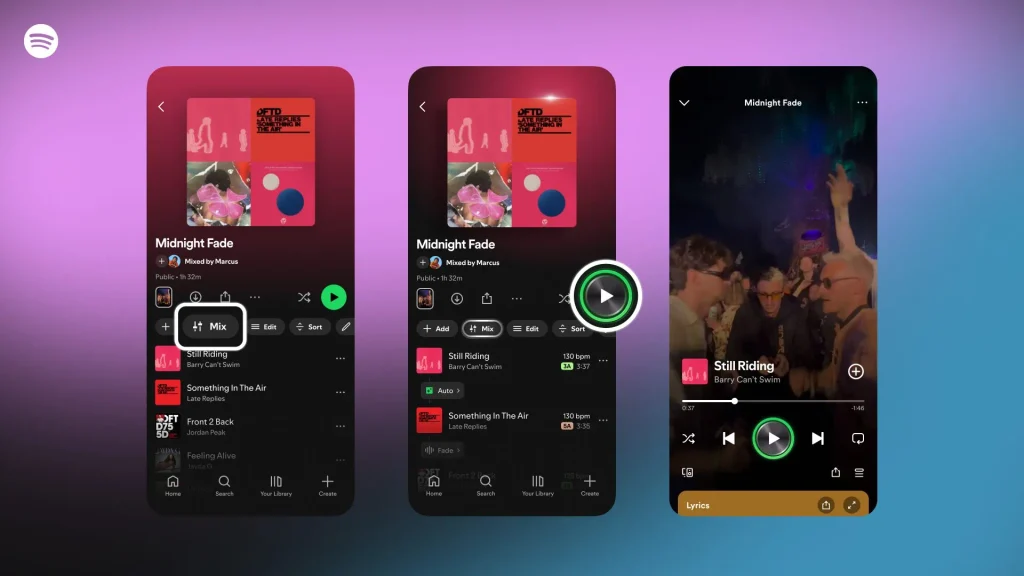
Streaming service Spotify is expanding its built-in Mix tool, allowing users to transform a standard playlist into a seamless DJ set. Available to Premium subscribers, the feature offers deep manual control over track transitions, ranging from three-band equalizer adjustments and frequency filtering to harmonic matching by tempo and key.
Equalizer, BPM, and Frame-by-Frame Transition Control
Unlike standard crossfading (Crossfade), which simply overlaps the end of one track with the beginning of the next, Mix mode operates like professional DJ software.
As announced in Spotify’s official release, the platform’s algorithms analyze the waveform, beat grid, tempo (BPM), and musical key of every track.
Users can adjust the following manual settings:
- precise selection of transition start and end points directly on the waveform plot;
- independent volume control for both tracks during the overlap;
- a three-band equalizer (EQ) to independently tweak low, mid, and high frequencies (for instance, to smoothly cut bass before a drop);
- high-pass and low-pass filters (HPF/LPF);
- ready-to-use automatic transition presets such as Fade and Rise.
Smart Reorder Sorting and 220 Million Hours Streamed
For listeners who prefer not to build harmonic track sequences manually, Spotify added Smart Reorder. The algorithm automatically rearranges tracks in a playlist so adjacent songs match in key and speed, preventing abrupt dynamic changes.
According to the service’s internal metrics, total listening time for mixed playlists has surpassed 220 million hours.
Collaborative Sets and Playlists Curated by Global Stars
To showcase what the feature can do, Spotify introduced the Mixed By section, featuring exclusive sets mixed by top electronic producers and artists: Martin Garrix, Steve Aoki, Chris Lake, Don Diablo, PinkPantheress, and SOFI TUKKER.
Mix mode also supports collaborative playlists (Collaborative Playlists), letting friends populate shared playlists and edit transitions remotely.
However, the tool comes with a few technical caveats:
- Paid tier required: seamless transitions are accessible only to Premium subscribers (free accounts playback playlists with standard gaps between tracks);
- Connect limitations: when casting audio via Spotify Connect to certain external smart speakers, transitions are temporarily disabled (mixes continue to function normally over Bluetooth).
Understanding the Difference Between Mix, AI DJ, and SongDNA
Spotify’s recent feature additions can be easy to confuse, but they target distinct use cases:
- Mix: an editor for manually mixing tracks and tweaking transitions inside playlists;
- AI DJ: a personalized virtual DJ powered by generative AI that adds voice commentary over tracks and creates a dynamic radio feed;
- SongDNA: an informational panel launched in spring that details songwriters, producers, samples used, and cover versions of a song.
How to Enable Playlist Mixing in the App
According to Spotify’s support documentation, to create your own set on desktop or mobile:
- Open any playlist you created;
- Tap the Mix icon in the top control bar;
- Keep the default automated transition or tap the bar between tracks to open the manual equalizer menu;
- Adjust your transition points and save the mix.
Custom transitions are saved to the cloud and play automatically whenever the playlist is launched.
Spotify now lets users customize epic transitions between tracks. A Mix button has appeared in playlists for some users — the feature isn’t available in all regions yet. pic.twitter.com/x4ssYgSGLX pic.twitter.com/HDUsfQR0yl
— ивус (@ogivus) August 30, 2026
Thanks to it, you can customize transitions between every track in…