











A free CapCut alternative with no subscriptions or cloud: video editor Concat enters beta
 ·
22.09.2026 17:45
·
3 min read
·
22.09.2026 17:45
·
3 min read
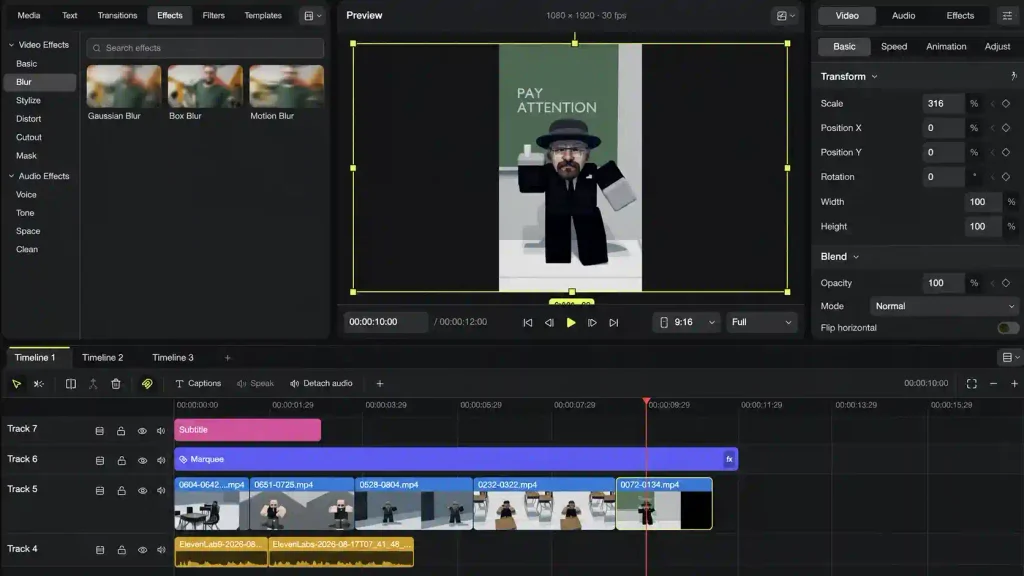
On September 19, 2026, developer jub0t released update 0.2.3 for the open-source video editor Concat, previously known as WolfCut. The project is being built as a direct, completely free alternative to the popular CapCut, but without mandatory account linking, paid subscriptions or sending data to remote servers. For creators of short vertical videos, it’s a practical replacement at a time when ByteDance’s official service keeps restricting basic features and pushing paid tiers.
Along with the name change, the editor has officially moved from early alpha to public beta testing. All file processing, editing and effect generation happen entirely locally on the user’s device, which keeps source files private and makes the app independent of external blocks.
Clip editing, captions and local neural networks
In its interface logic and toolset, Concat closely mirrors familiar mobile and desktop editors. The program supports a multi-track timeline, frame-by-frame cutting, clip merging, keyframes, transition libraries, flexible speed changes, filters and audio adjustment.
The editor’s key advantage is its work with local artificial intelligence:
- automatic subtitle generation runs on the built-in Whisper model — once language packs are downloaded, no internet connection is needed for speech recognition;
- local text-to-speech (TTS) is available for voiceovers;
- voice filters are built in to change the timbre and pitch of a track;
- experimental support for the MCP (Model Context Protocol) has been added to connect with external AI tools.
CAPCUT AND CANVA ARE CONVENIENT. THIS GITHUB REPO IS FREE AND OPEN SOURCE.
— Guri Saroy (@HeyGurisaroy) September 15, 2026
It’s called Concat.
It’s a free, open-source CapCut alternative that runs entirely on your machine.
No account. No subscription. No watermarks.
→ Multi-track video editing
→ Split, trim, merge,… pic.twitter.com/VX2RuXI05p
Available platforms and beta limitations
The project is distributed under the open AGPL-3.0 license. The Concat repository page on GitHub offers ready-made builds for Windows, macOS and Linux, plus an APK build for Android. Desktop users can choose either classic installers or portable versions that run without installing to the system. The iPadOS and iOS build is still marked by the developers as experimental.
When using the editor, keep the development stage in mind: the Concat releases list on GitHub notes that build 0.2.3 has beta status. Bugs and crashes are possible when processing heavy formats, and the speed of subtitle generation and speech synthesis depends directly on the computing power of the computer’s or smartphone’s CPU and GPU.
