








Claude Code and Codex Can Now Edit Video: AI Learns to Work Directly with Premiere Pro and After Effects Projects
 ·
08.10.2026 17:29
·
3 min read
·
08.10.2026 17:29
·
3 min read
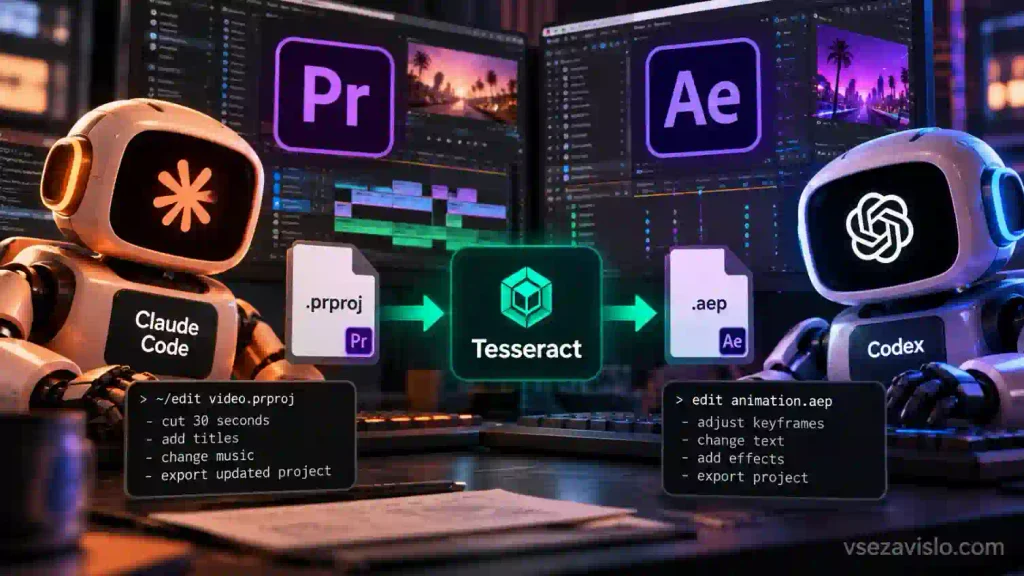
Text-based AI assistants are moving beyond writing code and into video production. Mirage has added support for Adobe Premiere Pro and After Effects project converters to its open-source Tesseract engine. Popular autonomous agents like Claude Code and OpenAI Codex can now cut timelines, adjust timing, set keyframes and apply basic graphics from text prompts, then return a fully editable project file.
The key difference between this approach and generative models like Sora or Runway is that it preserves control. The AI doesn’t create flat video with generated artifacts — it works directly with the editor’s source files and tracks. The user hands the agent a .prproj or .aep file along with the media files, and the Tesseract module converts the project’s internal structure into its own .tsrct format.
The agent can be assigned routine work: for example, trimming a rough cut down to 30 seconds, removing long pauses, reordering scenes, replacing titles or tweaking shape animations. Once the edits are made, the program compiles them back into a standard Premiere Pro or After Effects file, where a specialist can continue polishing by hand.
Working with project code instead of a virtual mouse
The system doesn’t try to imitate a human’s clicks through screen recognition (computer use). Changes are made directly to layer structures, animation curves and project parameters at the level of the engine’s internal data, as described in the Tesseract feature list. This guarantees instant, precise edits with no cursor-positioning errors.
The Tesseract runtime runs entirely locally on Windows, macOS and Linux. The engine itself is distributed free of charge, requires no separate account and supports both command-line tools like Claude Code and Codex CLI and desktop interfaces for the models. Developers pay only for tokens in the API of their chosen AI model, as noted in the Codex setup guide.
Now Claude and ChatGPT can natively create Premiere (.PRPROJ) and After Effects (.AEP) files. We’ve added open-source converters to Tesseract, our creative suite for agents, to make it possible. It works both ways. Bring your existing Adobe projects into Tesseract and let your agent pick up where you left off, or vice versa. This is our first open-source release, and compatibility isn’t perfect yet. Create projects, tell us what breaks, or contribute a fix. Help us make Tesseract better for everyone. Try now for free.
— Mirage (@trymirage) October 6, 2026
Experimental status and technical limitations
Despite its impressive capabilities, the technology isn’t ready to replace a human at the final render stage. According to the Premiere Pro converter documentation, two-way data exchange doesn’t yet support all of Adobe’s system features, and the After Effects export module is explicitly labeled experimental in the developer documentation.
Third-party plugins, heavy color LUTs, complex interpolation curves and non-standard fonts may break or reset to default values during conversion. The creators recommend always keeping backups of the original files.
Even so, the converters’ source code is open under the permissive MIT license. If the community improves seamless support for complex effects, video editors will gain a powerful tool: automated rough assembly of clips right inside the familiar Adobe ecosystem.