










Draw an Interface and Hand It to AI: How Open-Source Builder M3E Canvas Works
 ·
05.09.2026 19:58
·
2 min read
·
05.09.2026 19:58
·
2 min read
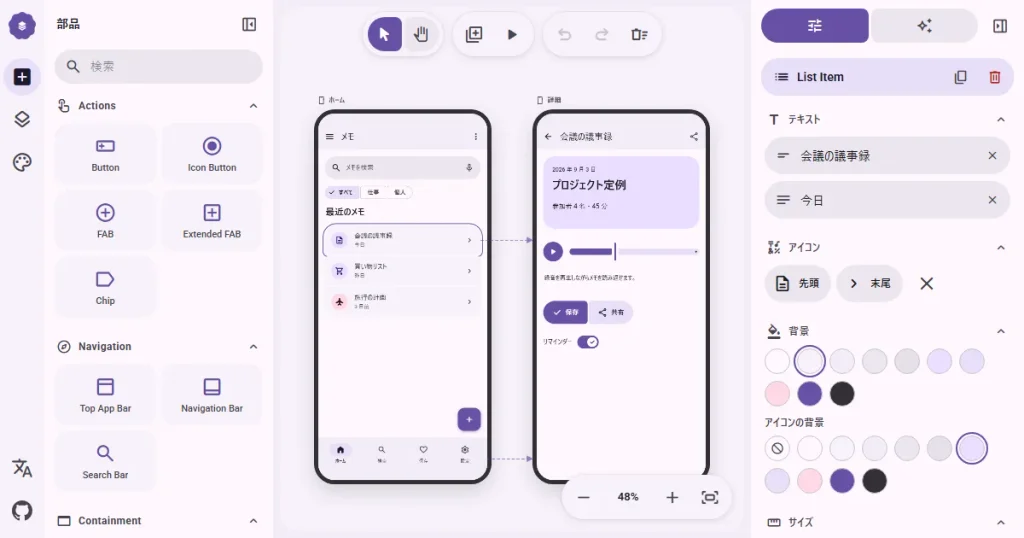
M3E Canvas, a free open-source browser-based interface builder, is gaining popularity among developers and proponents of “vibe coding.” The tool tackles a classic problem when working with AI: instead of spending time describing a desired design in words, users can assemble a screen using pre-built blocks with a mouse, while the service converts the visual prototype into a structured prompt for Cursor, Claude Code, Codex, or Gemini CLI.
Google-Standard Design and Interactive Prototypes
The project is available in a GitHub repository under the open MIT license. Its entire component library relies on the principles of Google’s Material 3 Expressive design system. Users can drag and drop buttons, lists, cards, dialog boxes, input fields, tabs, and navigation bars onto the canvas, complete with automatic alignment and layer management.
Layouts support custom color palettes, fonts, contrast settings, light or dark modes, and screen transition animations (slide, fade, or zoom). The tool also features an interactive testing mode: users can assign actions to buttons and cards to fully test the interface directly in the browser, complete with support for mobile touch gestures and swipes.
Local-First Workflow and Specification Export
M3E Canvas itself does not generate application code—which is its key distinction from layout generators. Instead, it acts as an architect: it scans the visual arrangement of elements, text labels, and links between screens, generating comprehensive technical specifications for autonomous AI coding agents targeting the web or native Android.
The builder stands out for its privacy-minded approach to data handling:
- The service is fully standalone, with no server backend, user accounts, or tracking scripts;
- All work and projects are stored exclusively in local browser storage;
- To generate text descriptions for UI elements, users can connect a personal API key from OpenAI, Anthropic, Gemini, or DeepSeek, sending requests directly from the client to the provider without intermediaries.
Localization remains one of the project’s rough edges: the editor interface is currently available only in Chinese and Japanese, though users can export the final AI prompts in plain English. Additionally, the multi-window mode works best on desktop screens, as the mobile version of the canvas is significantly stripped down.
新しいAI機能を追加しました!🎉
— いのり (@lnkiai) September 5, 2026
デザインやUI組み立てが苦手でも、作りたいアプリを一言で伝えると画面が完成します!
また、作成したデザイン案は共有リンクで、友達やチームに配布することもできます👇️https://t.co/N3Ehb5ORjZ pic.twitter.com/HBDWqKLv7k
You can try out the editor without registering on the official M3E Canvas page.
