










Telegram Desktop 7.1 Bypasses Strict Censorship via WEB Proxy, Adds Built-In Video Editor
 ·
22.08.2026 22:37
·
2 min read
·
22.08.2026 22:37
·
2 min read
Pavel Durov’s team has released a major update to the Telegram Desktop client (version 7.1). The primary technical addition is a brand-new connection method — WEB proxy — designed to ensure message delivery despite strict state traffic filtering and advanced deep packet inspection (DPI) systems.
The latest version of the messenger is already available for download on the official Telegram Desktop website and in the project repository on GitHub.
How WEB Proxy Works and Why It Is Harder to Block
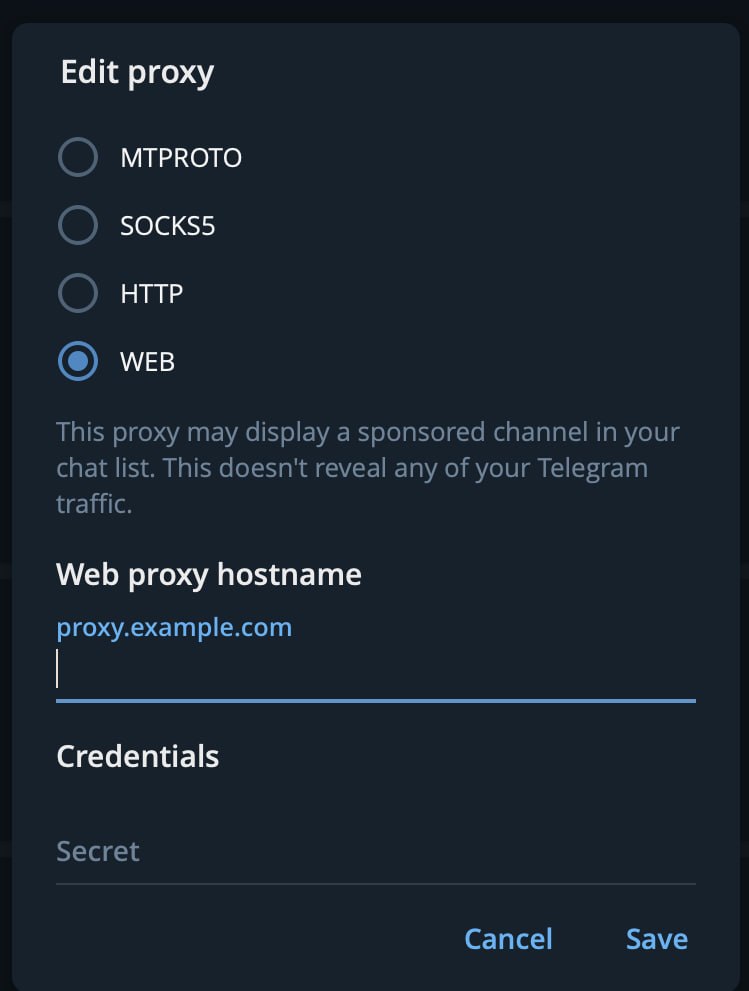
Unlike the traditional MTProxy protocol, which uses FakeTLS technology to disguise packets, the new system relies on a hidden embedded browser engine, WebView:
- Genuine web traffic: the connection originates as a full HTTPS session over standard port 443 to a trusted domain, making it indistinguishable from visiting a regular website in a browser;
- WebSocket tunneling: encrypted MTProto traffic is packaged inside a legitimate web channel;
- Quick-connect links: the client now supports links formatted as tg://webproxy and https://t.me/webproxy for automatic connection setup.
The new protocol overcomes advanced DPI systems that have learned to identify and block FakeTLS signatures by analyzing subtle handshake anomalies. Using the feature requires proxy server support, which the messaging team is expanding in ongoing builds.
Built-In Video Editor, Rich Text Formatting, and Disappearing Media
Beyond network improvements, update 7.1 delivers a substantial set of user features:
- Video editing: users can now trim video clips, choose compression levels, and manually select preview cover frames before sending;
- Disappearing media: the desktop app adds self-destruct timers and a view-once mode (View-Once) for private photos and videos;
- Advanced Rich Text: improved Markdown processing when pasting text, along with support for tables, interactive lists, embedded file blocks, and buttons directly inside message bodies;
- Video avatars and music sharing: profile videos can now be assigned to personal accounts, groups, and channels, while audio tracks can be attached directly from the general attachments menu.
In addition, the app can now remember open chat windows and automatically restore the session after restarting. Right after the major update, developers rolled out a 7.1.1 hotfix addressing message loading issues in certain groups.