








“Moof!” in Settings: Apple Hid an iOS 27 Easter Egg Featuring the Legendary 1980s Dogcow Mascot
 ·
15.09.2026 15:08
·
2 min read
·
15.09.2026 15:08
·
2 min read
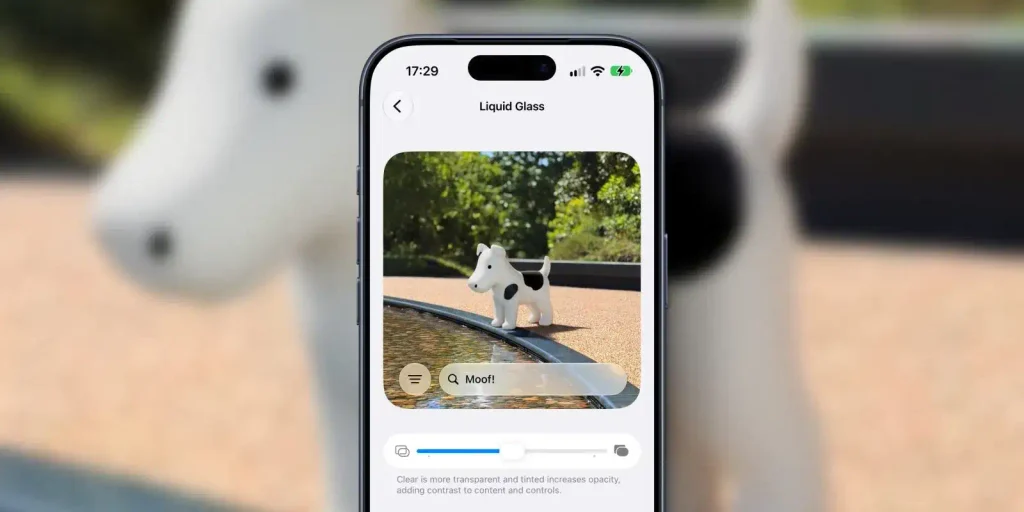
A hidden Easter egg honoring Clarus the Dogcow — one of the most recognizable characters in early Macintosh history — has been discovered in the release builds of iOS 27, iPadOS 27 and macOS 27 Golden Gate. The developers tucked the retro mascot neatly inside the appearance settings menu for the new Liquid Glass interface.
How to Find the Secret in the Liquid Glass Menu
The interface transparency slider is officially documented in the user guide on Apple’s support site, but the company chose not to mention the hidden surprise.
To see Clarus, the folks at MacRumors suggest a simple sequence of steps:
- Open the system display settings and go to the Liquid Glass tab;
- Scroll the Welcome to Apple Park demo block all the way to the bottom of the page;
- Drag the screen upward past the bottom edge with your finger (perform an overscroll gesture).
The image then changes: a two-dimensional dogcow figure appears on the shore of the pond at the Apple Park campus, and a rainbow-colored “Moof!” flashes in the search bar — the character’s signature sound, which has become part of programmer folklore.
Susan Kare’s Legacy and Cult Status
The mascot’s story began in 1984. Famed designer Susan Kare drew the unusual animal for the Cairo pixel font that shipped with the first Macs. The drawing was later built into the print settings menu of the classic Mac OS: the pose of the dog-cow hybrid served as a visual indicator of portrait or landscape page orientation before sending a document to the printer.
Over time the character acquired the name Clarus and became the unofficial mascot of Apple Developer Technical Support (DTS).
According to 9to5Mac, the Easter egg also works in the desktop version of macOS 27. What’s more, if you type the text command “Moof!” into the Spotlight smart search bar, the Siri voice assistant responds with a hidden line: “Nice dogcow.” This isn’t the first time the mascot has returned to the system, but this time Apple built a hello from the eighties right into the interface settings of its new operating system.