








iOS 27 Adds the Ability to Save Video Frames as Full-Fledged Photos
 ·
17.09.2026 18:17
·
2 min read
·
17.09.2026 18:17
·
2 min read
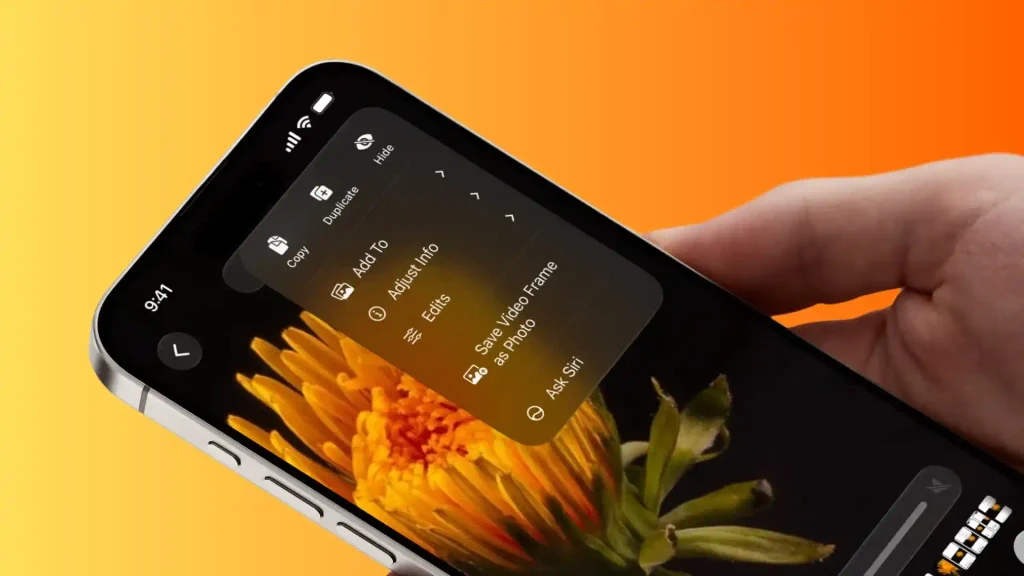
Apple has added the ability to export any still frame from a video as a separate photo at its original resolution to the Photos app in iOS 27. Previously, iPhone owners had to take a regular screenshot and crop it by hand or download third-party utilities from the App Store.
Original 4K resolution and preserved metadata
The process is as simple as it gets: open a video in the gallery, pause playback at the moment you want, tap the three-dot button in the top-right corner and choose “Save Video Frame as Photo.” According to Apple’s official support guide, the shot is added to the device’s media library right away.
The main difference between the new option and an ordinary screenshot is the quality and the preservation of the original data:
- True resolution: if the clip was shot in 4K, the frame is exported at a true 3840 × 2160 pixels, whereas a standard screenshot is limited by the physical resolution of the iPhone’s display panel;
- Clean frame: the shot has no system interface elements, no timeline scroll bar and no black bars along the edges;
- Format and metadata: the image is saved as a standard photo in HEIF or JPEG (depending on camera settings), fully inheriting the date, time and geotag of the original video file.
As Macworld explains, because the original date is preserved, the new frame appears next to the video itself in the gallery’s “By Day” sorting mode, while in the “Recents” tab it shows up at the very end of the list.
Available on iPad and Mac
The same functionality is now available in iPadOS 27 and the macOS 27 desktop operating system. According to iDownloadBlog, on Macs you can pull the frame you need through the context menu by right-clicking the video, or through the top menu bar via “Image” → “Save Video Frame as Photo.”
The tool solves a practical problem when shooting dynamic scenes: animals, children or sporting events. Instead of trying to catch a good angle with burst photography or pressing the white capture button while recording video (which reduces the final sharpness), you can now shoot smooth 4K footage at 60 frames per second and then calmly extract a perfect still without losing detail.